
Changing the code in your Classic Key SafeUpdated a month ago
Before you begin, please remember
You will need to select your own combination, ideally featuring between 5 and 7 digits. Each number can only be used once.
Do not use a combination that can be easily guessed.
There is no override or reset code. Make a note of your code and store it somewhere safe.
Setting your combination
Pull open the black weather cover.
Press down on the CLEAR button (located in the centre of the key safe) and then release.
Press down on the OPEN button and remove the lid (the part with the black buttons).
Slide the white plastic card (code change tool) on the back of the lid out and remove. This will reveal ten grey buttons on the back of the lid. Each of these grey buttons corresponds to the black buttons on the front of the key safe. These buttons each have small arrows. Arrows pointing towards the locking pin are OFF and are not part of the combination. Arrows pointing away from the locking pin are ON and are part of the combination.
Use the white plastic card provided (code change tool) to turn all the grey dials to the OFF position. This will reset your combination. Then use the same code change tool to create your new code.
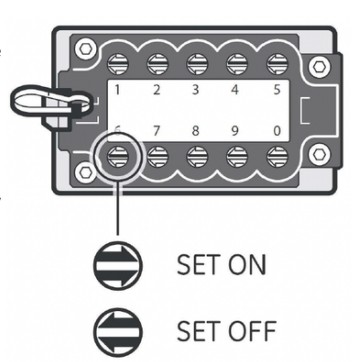
Note: Do not use a screwdriver!
To add a number to your code, use the code change tool to push in the grooved button by the number you wish to set. Turn 180° until the button pops back up completely and the arrow points in the ON direction (away from the hinge). To remove a number or letter from the code, use the code change tool to push in the grooved button by the number you wish to unset. Turn 180° until the button pops back up completely and the arrow points in the OFF direction (towards the locking pin).
Return the code change tool over the back of the lid.
Testing your combination
On the front of the Key Safe, pressing only the buttons in your combination, press each button in until it clicks. If you press the wrong button, push down on the clear button and enter your code again.
Press down on the OPEN button open. If the combination is set correctly, the locking pin will retract fully. If it does not, push down the CLEAR button and check to ensure you have entered the correct code. Refer to "Setting your combination" if you continue to experience difficulty.
You must enter your code to both open and close your key safe.
Opening and closing your key safe
Once you have tested your code you will need to enter it again to close the key safe. Once you enter your code, you do not have to press the OPEN button until you are ready. There is no time limit between entering your code and operating the OPEN button.
Download instructions here -